> ## Documentation Index
> Fetch the complete documentation index at: https://algolia.com/llms.txt
> Use this file to discover all available pages before exploring further.
# Build a Query Suggestions UI
> Build a user interface to show Query Suggestions in your InstantSearch Android app.
export const FlavorSwitcher = ({current, baseHref = "", options = [], label = "InstantSearch framework"}) => {
if (options.length === 0) {
return
FlavorSwitcher requires at least one option.
;
}
const selected = options.find(option => option.value === current) ?? options[0];
return ;
};
When your user interacts with a search box,
you can help them discover what they could search for by providing **Query suggestions**.
Query suggestions are a specific kind of multi-index interface:
* The main search interface will use a regular index.
* As users type a phrase, suggestions from your [Query Suggestions index](/doc/guides/building-search-ui/ui-and-ux-patterns/query-suggestions/android) are displayed.
## Usage
To display the suggestions:
* Create a Query Suggestions index from your main index.
* Implement a Multi-Index search experience using both indices.
* When clicking on a suggestion, set the query to the chosen suggestion.
## Before you begin
To use InstantSearch Android, you need an Algolia account.
Either [create a new account](https://dashboard.algolia.com/users/sign_up) or use the following credentials:
* Application ID: `latency`
* Search API key: `afc3dd66dd1293e2e2736a5a51b05c0a`
* Results index name: `STAGING_native_ecom_demo_products`
* Suggestions index name: `STAGING_native_ecom_demo_products_query_suggestions`
These credentials give you access to pre-existing datasets of products and Query Suggestions appropriate for this guide.
## Project structure
Algolia's query suggestions uses:
* `QuerySuggestionGuide`: main activity presenting the search experience,
* `SuggestionFragment`: fragment presenting the Query Suggestions,
* `ProductFragment`: fragment presenting the search results,
* `QuerySuggestionViewModel`: view model holding connectors and search business logic.
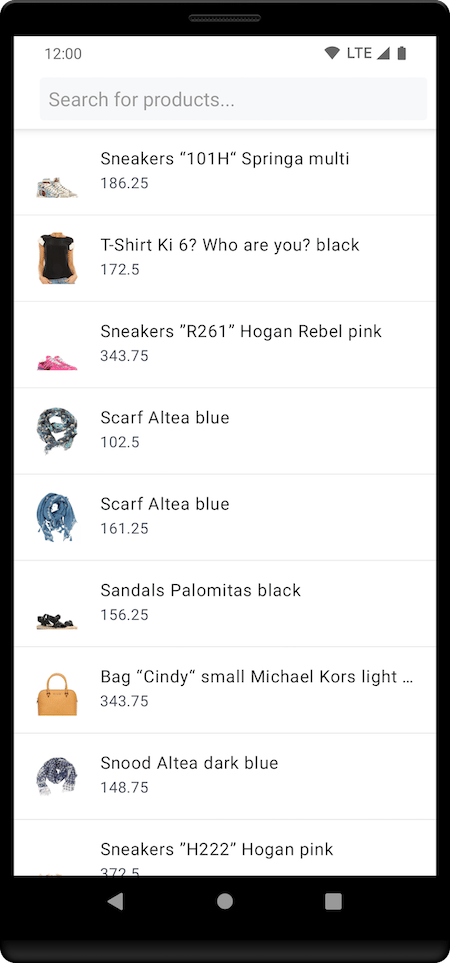
The initial screen shows the search box and results for an empty query:
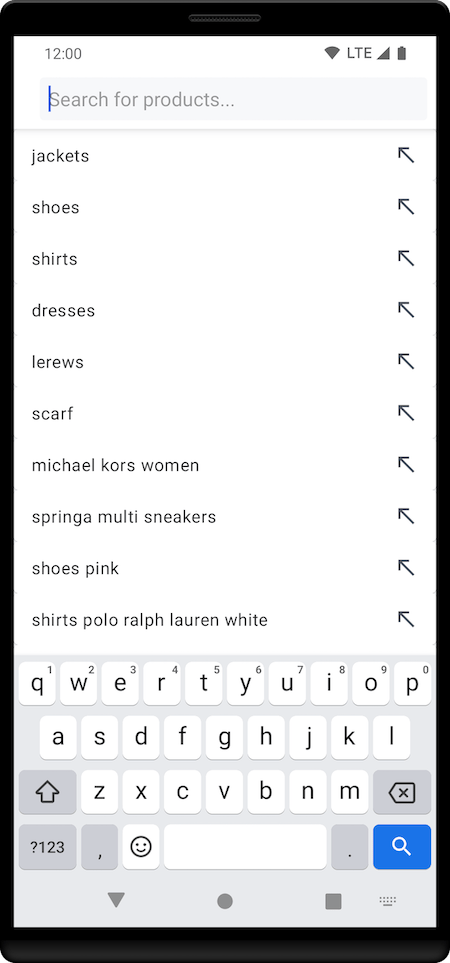
 When users tap the search box, a list of query suggestions are shown (the most popular for an empty query):
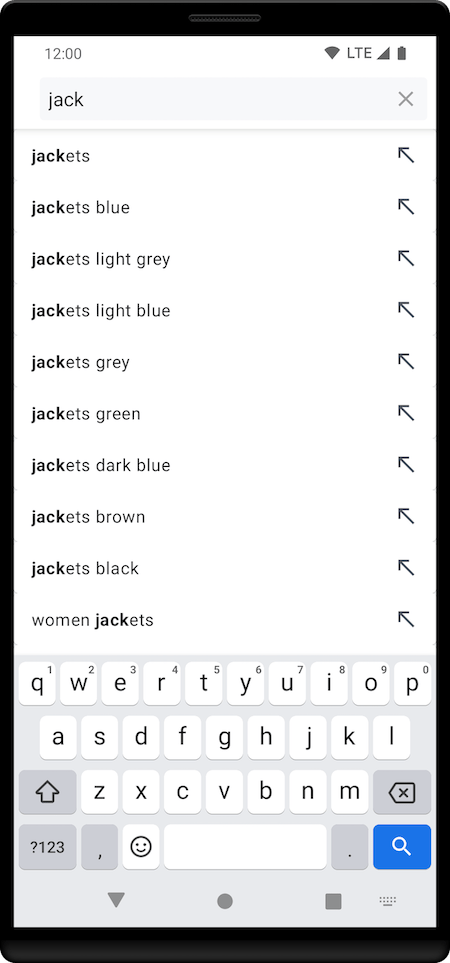
 On each keystroke, the list of suggestions is updated:
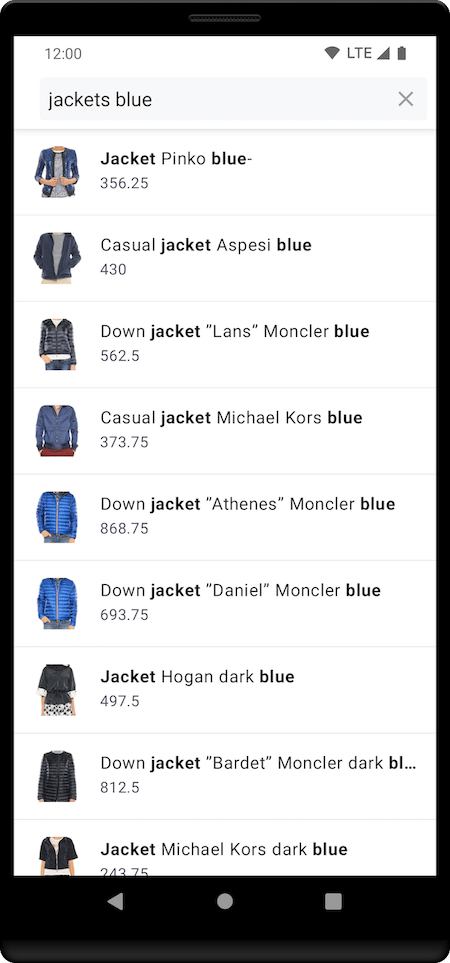
 When users select a suggestion from the list, it replaces the query in the search box, and the suggestions fragment disappears.
The products fragment presents search results for the selected query suggestion:
When users select a suggestion from the list, it replaces the query in the search box, and the suggestions fragment disappears.
The products fragment presents search results for the selected query suggestion:
 Algolia doesn't provide a ready-to-use views, but you can create them with the tools in the [InstantSearch Android](https://github.com/algolia/instantsearch-android) library.
## Business logic
Create `QuerySuggestionViewModel` view to setup the search components and create the necessary connections between them,
establishing the business logic:
```kotlin Kotlin icon=code theme={"system"}
class QuerySuggestionViewModel : ViewModel() {
val multiSearcher = MultiSearcher(
applicationID = "latency",
apiKey = "927c3fe76d4b52c5a2912973f35a3077"
)
val productSearcher = multiSearcher.addHitsSearcher(indexName = "STAGING_native_ecom_demo_products")
val suggestionSearcher = multiSearcher.addHitsSearcher(indexName = "STAGING_native_ecom_demo_products_query_suggestions")
val searchBox = SearchBoxConnector(multiSearcher)
val suggestions = MutableLiveData()
override fun onCleared() {
multiSearcher.cancel()
searchBox.disconnect()
}
}
```
## Products view
Create `Product` data class corresponding the index hits:
```kotlin Kotlin icon=code theme={"system"}
import com.algolia.instantsearch.core.Indexable
@Serializable
data class Product(
val name: String,
@SerialName("image_urls") val images: List,
val price: Price,
val description: String,
override val objectID: String,
override val _highlightResult: JsonObject?
) : Indexable, Highlightable {
val highlightedName: HighlightedString?
get() = getHighlight("name")
}
@Serializable
data class Price(
val currency: String,
val value: String,
)
```
Create `ProductAdapter` to display search results:
```kotlin Kotlin icon=code theme={"system"}
class ProductAdapter : ListAdapter(ProductDiffUtil), HitsView {
override fun onCreateViewHolder(parent: ViewGroup, viewType: Int) =
ProductViewHolder(parent.inflate(R.layout.list_item_large))
override fun onBindViewHolder(holder: ProductViewHolder, position: Int) =
holder.bind(getItem(position))
override fun setHits(hits: List) = submitList(hits)
class ProductViewHolder(private val view: View) : RecyclerView.ViewHolder(view) {
fun bind(item: Product) {
view.findViewById(R.id.itemTitle).text =
item.highlightedName?.toSpannedString() ?: item.name
view.findViewById(R.id.itemSubtitle).text = item.price.value
Glide
.with(view.context)
.load(item.images.first())
.into(view.findViewById(R.id.itemImage))
}
}
private object ProductDiffUtil : DiffUtil.ItemCallback() {
override fun areItemsTheSame(oldItem: Product, newItem: Product) = oldItem.objectID == newItem.objectID
override fun areContentsTheSame(oldItem: Product, newItem: Product) = oldItem == newItem
}
}
```
Create `ProductFragment` to display product search results:
```kotlin Kotlin icon=code theme={"system"}
class ProductFragment : Fragment(R.layout.fragment_items) {
private val viewModel: QuerySuggestionViewModel by activityViewModels()
private val connection = ConnectionHandler()
override fun onViewCreated(view: View, savedInstanceState: Bundle?) {
super.onViewCreated(view, savedInstanceState)
// Configure products view
val productAdapter = ProductAdapter()
view.findViewById(R.id.items).configure(productAdapter) // Configure the RecyclerView with the adapter
connection += viewModel.productSearcher.connectHitsView(productAdapter) {
it.hits.deserialize(Product.serializer())
}
// Run initial search
viewModel.productSearcher.searchAsync()
}
override fun onDestroyView() {
super.onDestroyView()
connection.clear()
}
}
```
## Suggestions view
Create `Suggestion` data class corresponding the suggestions index hits:
```kotlin Kotlin icon=code theme={"system"}
import com.algolia.instantsearch.core.Indexable
@Serializable
data class Suggestion(
val query: String,
override val objectID: String,
override val _highlightResult: JsonObject?
) : Indexable, Highlightable {
val highlightedQuery: HighlightedString?
get() = getHighlight("query")
}
```
Create `SuggestionAdapter` to display suggestions list:
```kotlin Kotlin icon=code theme={"system"}
class SuggestionAdapter(private val onSuggestionClick: ((Suggestion) -> Unit)) :
ListAdapter(SuggestionAdapter),
HitsView {
override fun onCreateViewHolder(parent: ViewGroup, viewType: Int) =
SuggestionViewHolder(parent.inflate(R.layout.list_item_suggestion))
override fun onBindViewHolder(holder: SuggestionViewHolder, position: Int) {
val item = getItem(position)
holder.bind(item, onSuggestionClick)
}
override fun setHits(hits: List) = submitList(hits)
class SuggestionViewHolder(private val view: View) : RecyclerView.ViewHolder(view) {
fun bind(item: Suggestion, onClick: ((Suggestion) -> Unit)) {
view.setOnClickListener { onClick(item) }
view.findViewById(R.id.itemName).text = item.highlightedQuery?.toSpannedString() ?: item.query
}
}
companion object : DiffUtil.ItemCallback() {
override fun areItemsTheSame(oldItem: Suggestion, newItem: Suggestion) =
oldItem.objectID == newItem.objectID
override fun areContentsTheSame(oldItem: Suggestion, newItem: Suggestion): Boolean =
oldItem == newItem
}
}
```
Create `SuggestionFragment` to display suggestions' recycler view adapter,
and to notify `QuerySuggestionViewModel` when a suggestion selection is made:
```kotlin Kotlin icon=code theme={"system"}
class SuggestionFragment : Fragment(R.layout.fragment_items) {
private val viewModel: QuerySuggestionViewModel by activityViewModels()
private val connection = ConnectionHandler()
override fun onViewCreated(view: View, savedInstanceState: Bundle?) {
super.onViewCreated(view, savedInstanceState)
// Configure suggestions view
val suggestionAdapter = SuggestionAdapter {
// On suggestion click, update the
viewModel.suggestions.value = it
}
view.findViewById(R.id.items).configure(suggestionAdapter) // Configure the RecyclerView with the adapter
connection += viewModel.suggestionSearcher.connectHitsView(suggestionAdapter) {
it.hits.deserialize(Suggestion.serializer())
}
// Run initial search
viewModel.suggestionSearcher.searchAsync()
}
override fun onDestroyView() {
super.onDestroyView()
connection.clear()
}
}
```
## Setup layout
Finally, create `QuerySuggestionActivity` activity, and display `ProductFragment` and `SuggestionFragment` on `SearchBox`
```kotlin Kotlin icon=code theme={"system"}
class QuerySuggestionActivity : AppCompatActivity() {
private val viewModel by viewModels()
private val connection = ConnectionHandler()
override fun onCreate(savedInstanceState: Bundle?) {
super.onCreate(savedInstanceState)
setContentView(R.layout.activity_query_suggestion)
// Setup search box
val searchView = findViewById(R.id.searchView)
val searchBoxView = SearchBoxViewAppCompat(searchView)
connection += viewModel.searchBox.connectView(searchBoxView)
// Switch fragments on search box focus
searchView.setOnQueryTextFocusChangeListener { _, hasFocus ->
if (hasFocus) showSuggestions() else showProducts()
}
// Observe suggestions
viewModel.suggestions.observe(this) { searchBoxView.setText(it.query, true) }
// Initially show products view
showProducts()
}
private fun showSuggestions() {
supportFragmentManager.commit {
replace(R.id.container)
setReorderingAllowed(true)
addToBackStack("suggestions") // name can be null
}
}
private fun showProducts() {
supportFragmentManager.commit {
replace(R.id.container)
setReorderingAllowed(true)
addToBackStack("products") // name can be null
}
}
override fun onDestroy() {
super.onDestroy()
connection.clear()
}
}
```
## Going further
Your query suggestions search experience is now ready to use.
You can find a complete project in the [Android examples repository](https://github.com/algolia/instantsearch-android-examples).
Algolia doesn't provide a ready-to-use views, but you can create them with the tools in the [InstantSearch Android](https://github.com/algolia/instantsearch-android) library.
## Business logic
Create `QuerySuggestionViewModel` view to setup the search components and create the necessary connections between them,
establishing the business logic:
```kotlin Kotlin icon=code theme={"system"}
class QuerySuggestionViewModel : ViewModel() {
val multiSearcher = MultiSearcher(
applicationID = "latency",
apiKey = "927c3fe76d4b52c5a2912973f35a3077"
)
val productSearcher = multiSearcher.addHitsSearcher(indexName = "STAGING_native_ecom_demo_products")
val suggestionSearcher = multiSearcher.addHitsSearcher(indexName = "STAGING_native_ecom_demo_products_query_suggestions")
val searchBox = SearchBoxConnector(multiSearcher)
val suggestions = MutableLiveData()
override fun onCleared() {
multiSearcher.cancel()
searchBox.disconnect()
}
}
```
## Products view
Create `Product` data class corresponding the index hits:
```kotlin Kotlin icon=code theme={"system"}
import com.algolia.instantsearch.core.Indexable
@Serializable
data class Product(
val name: String,
@SerialName("image_urls") val images: List,
val price: Price,
val description: String,
override val objectID: String,
override val _highlightResult: JsonObject?
) : Indexable, Highlightable {
val highlightedName: HighlightedString?
get() = getHighlight("name")
}
@Serializable
data class Price(
val currency: String,
val value: String,
)
```
Create `ProductAdapter` to display search results:
```kotlin Kotlin icon=code theme={"system"}
class ProductAdapter : ListAdapter(ProductDiffUtil), HitsView {
override fun onCreateViewHolder(parent: ViewGroup, viewType: Int) =
ProductViewHolder(parent.inflate(R.layout.list_item_large))
override fun onBindViewHolder(holder: ProductViewHolder, position: Int) =
holder.bind(getItem(position))
override fun setHits(hits: List) = submitList(hits)
class ProductViewHolder(private val view: View) : RecyclerView.ViewHolder(view) {
fun bind(item: Product) {
view.findViewById(R.id.itemTitle).text =
item.highlightedName?.toSpannedString() ?: item.name
view.findViewById(R.id.itemSubtitle).text = item.price.value
Glide
.with(view.context)
.load(item.images.first())
.into(view.findViewById(R.id.itemImage))
}
}
private object ProductDiffUtil : DiffUtil.ItemCallback() {
override fun areItemsTheSame(oldItem: Product, newItem: Product) = oldItem.objectID == newItem.objectID
override fun areContentsTheSame(oldItem: Product, newItem: Product) = oldItem == newItem
}
}
```
Create `ProductFragment` to display product search results:
```kotlin Kotlin icon=code theme={"system"}
class ProductFragment : Fragment(R.layout.fragment_items) {
private val viewModel: QuerySuggestionViewModel by activityViewModels()
private val connection = ConnectionHandler()
override fun onViewCreated(view: View, savedInstanceState: Bundle?) {
super.onViewCreated(view, savedInstanceState)
// Configure products view
val productAdapter = ProductAdapter()
view.findViewById(R.id.items).configure(productAdapter) // Configure the RecyclerView with the adapter
connection += viewModel.productSearcher.connectHitsView(productAdapter) {
it.hits.deserialize(Product.serializer())
}
// Run initial search
viewModel.productSearcher.searchAsync()
}
override fun onDestroyView() {
super.onDestroyView()
connection.clear()
}
}
```
## Suggestions view
Create `Suggestion` data class corresponding the suggestions index hits:
```kotlin Kotlin icon=code theme={"system"}
import com.algolia.instantsearch.core.Indexable
@Serializable
data class Suggestion(
val query: String,
override val objectID: String,
override val _highlightResult: JsonObject?
) : Indexable, Highlightable {
val highlightedQuery: HighlightedString?
get() = getHighlight("query")
}
```
Create `SuggestionAdapter` to display suggestions list:
```kotlin Kotlin icon=code theme={"system"}
class SuggestionAdapter(private val onSuggestionClick: ((Suggestion) -> Unit)) :
ListAdapter(SuggestionAdapter),
HitsView {
override fun onCreateViewHolder(parent: ViewGroup, viewType: Int) =
SuggestionViewHolder(parent.inflate(R.layout.list_item_suggestion))
override fun onBindViewHolder(holder: SuggestionViewHolder, position: Int) {
val item = getItem(position)
holder.bind(item, onSuggestionClick)
}
override fun setHits(hits: List) = submitList(hits)
class SuggestionViewHolder(private val view: View) : RecyclerView.ViewHolder(view) {
fun bind(item: Suggestion, onClick: ((Suggestion) -> Unit)) {
view.setOnClickListener { onClick(item) }
view.findViewById(R.id.itemName).text = item.highlightedQuery?.toSpannedString() ?: item.query
}
}
companion object : DiffUtil.ItemCallback() {
override fun areItemsTheSame(oldItem: Suggestion, newItem: Suggestion) =
oldItem.objectID == newItem.objectID
override fun areContentsTheSame(oldItem: Suggestion, newItem: Suggestion): Boolean =
oldItem == newItem
}
}
```
Create `SuggestionFragment` to display suggestions' recycler view adapter,
and to notify `QuerySuggestionViewModel` when a suggestion selection is made:
```kotlin Kotlin icon=code theme={"system"}
class SuggestionFragment : Fragment(R.layout.fragment_items) {
private val viewModel: QuerySuggestionViewModel by activityViewModels()
private val connection = ConnectionHandler()
override fun onViewCreated(view: View, savedInstanceState: Bundle?) {
super.onViewCreated(view, savedInstanceState)
// Configure suggestions view
val suggestionAdapter = SuggestionAdapter {
// On suggestion click, update the
viewModel.suggestions.value = it
}
view.findViewById(R.id.items).configure(suggestionAdapter) // Configure the RecyclerView with the adapter
connection += viewModel.suggestionSearcher.connectHitsView(suggestionAdapter) {
it.hits.deserialize(Suggestion.serializer())
}
// Run initial search
viewModel.suggestionSearcher.searchAsync()
}
override fun onDestroyView() {
super.onDestroyView()
connection.clear()
}
}
```
## Setup layout
Finally, create `QuerySuggestionActivity` activity, and display `ProductFragment` and `SuggestionFragment` on `SearchBox`
```kotlin Kotlin icon=code theme={"system"}
class QuerySuggestionActivity : AppCompatActivity() {
private val viewModel by viewModels()
private val connection = ConnectionHandler()
override fun onCreate(savedInstanceState: Bundle?) {
super.onCreate(savedInstanceState)
setContentView(R.layout.activity_query_suggestion)
// Setup search box
val searchView = findViewById(R.id.searchView)
val searchBoxView = SearchBoxViewAppCompat(searchView)
connection += viewModel.searchBox.connectView(searchBoxView)
// Switch fragments on search box focus
searchView.setOnQueryTextFocusChangeListener { _, hasFocus ->
if (hasFocus) showSuggestions() else showProducts()
}
// Observe suggestions
viewModel.suggestions.observe(this) { searchBoxView.setText(it.query, true) }
// Initially show products view
showProducts()
}
private fun showSuggestions() {
supportFragmentManager.commit {
replace(R.id.container)
setReorderingAllowed(true)
addToBackStack("suggestions") // name can be null
}
}
private fun showProducts() {
supportFragmentManager.commit {
replace(R.id.container)
setReorderingAllowed(true)
addToBackStack("products") // name can be null
}
}
override fun onDestroy() {
super.onDestroy()
connection.clear()
}
}
```
## Going further
Your query suggestions search experience is now ready to use.
You can find a complete project in the [Android examples repository](https://github.com/algolia/instantsearch-android-examples).