> ## Documentation Index
> Fetch the complete documentation index at: https://algolia.com/llms.txt
> Use this file to discover all available pages before exploring further.
# What is InstantSearch.js?
> What is the InstantSearch.js UI library and what are the available customization APIs.
export const Index = () =>
index
;
export const FlavorSwitcher = ({current, baseHref = "", options = [], label = "InstantSearch framework"}) => {
if (options.length === 0) {
return
{/* vale Google.WordList = NO */}
InstantSearch.js is an open source UI library for vanilla JS that lets you build a search interface in your frontend app.
InstantSearch focuses on enhancing your frontend with widgets that you can combine to create unique search interfaces.
Run and edit the What is InstantSearch.js? example in CodeSandbox.
InstantSearch offers three levels of increasing control over your UI:
1. Start with a **predefined widget** that you can configure and style with CSS.
2. To change its render output (DOM or Native), **customize a predefined widget** to render what you want.
3. To implement something that doesn't exist, create a **custom widget**.
## Predefined widgets
The recommended way to use InstantSearch is with its predefined widgets such as [`searchBox`](/doc/api-reference/widgets/search-box/js).
InstantSearch includes a [set of widgets](/doc/guides/building-search-ui/widgets/showcase/js) that are most often used in search experiences.
Widgets provide features and a rendered output.
You can place them anywhere on your UI, configure them, and style them with CSS.
For example, add the [`refinementList`](/doc/api-reference/widgets/refinement-list/js)\` widget and ask it to show a list of brands,
so your users can refine their search using those brands.
```js JavaScript icon=code theme={"system"}
instantsearch.widgets.refinementList({
container: document.querySelector("#brand"),
attribute: "brand",
});
```
### The InstantSearch wrapper
The [`instantsearch`](/doc/api-reference/widgets/instantsearch/js) wrapper communicates between your app and Algolia.
This is where you add all the widgets.
It accepts a search client and an name.
```js JavaScript icon=code theme={"system"}
const searchClient = algoliasearch(
"latency",
"6be0576ff61c053d5f9a3225e2a90f76",
);
const search = instantsearch({
indexName: "INDEX_NAME",
searchClient,
});
search.addWidgets([
instantsearch.widgets.refinementList({
container: document.querySelector("#brand"),
attribute: "brand",
}),
]);
```
Once you've added all the desired widgets to the wrapper, call the `start` method to begin searching:
```js JavaScript icon=code theme={"system"}
search.start();
```
### CSS theme
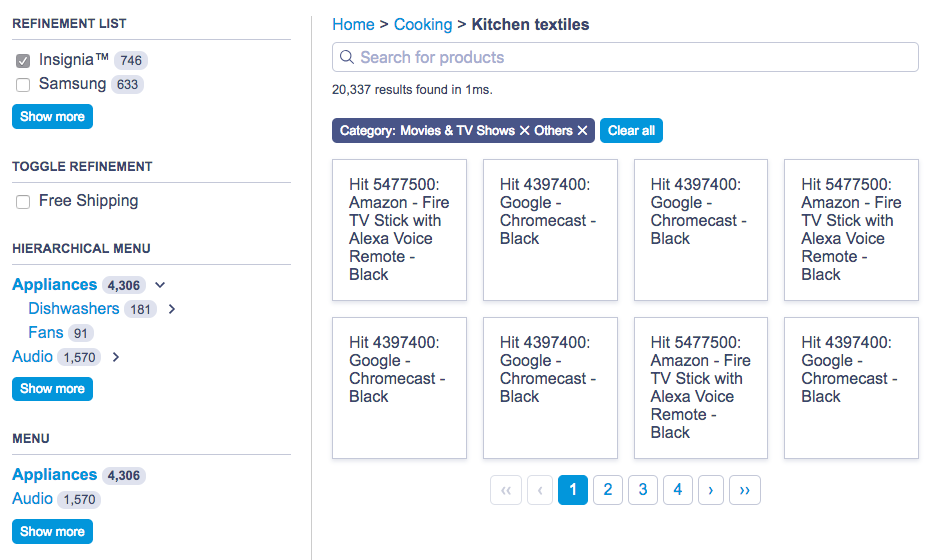
The predefined widgets in InstantSearch.js are compatible with the default CSS theme:
For more information, see [Style your widgets](/doc/guides/building-search-ui/widgets/customize-an-existing-widget/js#style-your-widgets).
## Customize widgets
Algolia's predefined widgets, with their fixed behavior and output, may not fully meet your requirements.
For example, you might want to customize the rendering of the [`menu`](/doc/api-reference/widgets/menu/js) widget to display as a [`select`](https://developer.mozilla.org/en-US/docs/Web/HTML/Element/select) element instead of a list of links. You may also want to render it as a keyboard-controlled slideshow of images.
To address these limitations, InstantSearch.js uses *connectors* to redefine widget behavior and DOM output.
For more information, see [Customize an InstantSearch.js widget](/doc/guides/building-search-ui/widgets/customize-an-existing-widget/js).
## Custom widgets
If none of the previous solutions work for you and you want to create a new widget from scratch,
InstantSearch provides a third API layer of API for this: **creating custom widgets**.
This requires two APIs: the first one lets you create a new connector, and the second one lets you create a new widget.
Both solutions give you full control of the render and behavior.
When building a new widget, be prepared to dive deep into the Algolia semantics to achieve what you want.
For more information, see [Create your own InstantSearch.js widgets](/doc/guides/building-search-ui/widgets/create-your-own-widgets/js).
## Resources
Use the following links and resources to learn more.
### See also
* [Install InstantSearch.js](/doc/guides/building-search-ui/installation/js)
* [Get started](/doc/guides/building-search-ui/getting-started/js)
* [API reference](/doc/api-reference/widgets/js)
* [Code Exchange](https://www.algolia.com/developers/code-exchange/?category=frontend-tools)
* [Support knowledge base](https://support.algolia.com/hc/en-us/sections/4406469041041-InstantSearch-InstantSearch-js)
### Join the community
Ask questions and find answers on the following platforms:
* [Algolia Community Discord](https://alg.li/discord)
* [Stack Overflow](https://stackoverflow.com/questions/tagged/instantsearch)
* [GitHub issues](https://github.com/algolia/instantsearch/issues)
* [Changelog](https://github.com/algolia/instantsearch/blob/master/packages/instantsearch.js/CHANGELOG.md)
 For more information, see [Style your widgets](/doc/guides/building-search-ui/widgets/customize-an-existing-widget/js#style-your-widgets).
## Customize widgets
Algolia's predefined widgets, with their fixed behavior and output, may not fully meet your requirements.
For example, you might want to customize the rendering of the [`menu`](/doc/api-reference/widgets/menu/js) widget to display as a [`select`](https://developer.mozilla.org/en-US/docs/Web/HTML/Element/select) element instead of a list of links. You may also want to render it as a keyboard-controlled slideshow of images.
To address these limitations, InstantSearch.js uses *connectors* to redefine widget behavior and DOM output.
For more information, see [Customize an InstantSearch.js widget](/doc/guides/building-search-ui/widgets/customize-an-existing-widget/js).
## Custom widgets
If none of the previous solutions work for you and you want to create a new widget from scratch,
InstantSearch provides a third API layer of API for this: **creating custom widgets**.
This requires two APIs: the first one lets you create a new connector, and the second one lets you create a new widget.
Both solutions give you full control of the render and behavior.
When building a new widget, be prepared to dive deep into the Algolia semantics to achieve what you want.
For more information, see [Create your own InstantSearch.js widgets](/doc/guides/building-search-ui/widgets/create-your-own-widgets/js).
## Resources
Use the following links and resources to learn more.
### See also
* [Install InstantSearch.js](/doc/guides/building-search-ui/installation/js)
* [Get started](/doc/guides/building-search-ui/getting-started/js)
* [API reference](/doc/api-reference/widgets/js)
* [Code Exchange](https://www.algolia.com/developers/code-exchange/?category=frontend-tools)
* [Support knowledge base](https://support.algolia.com/hc/en-us/sections/4406469041041-InstantSearch-InstantSearch-js)
### Join the community
Ask questions and find answers on the following platforms:
* [Algolia Community Discord](https://alg.li/discord)
* [Stack Overflow](https://stackoverflow.com/questions/tagged/instantsearch)
* [GitHub issues](https://github.com/algolia/instantsearch/issues)
* [Changelog](https://github.com/algolia/instantsearch/blob/master/packages/instantsearch.js/CHANGELOG.md)
For more information, see [Style your widgets](/doc/guides/building-search-ui/widgets/customize-an-existing-widget/js#style-your-widgets).
## Customize widgets
Algolia's predefined widgets, with their fixed behavior and output, may not fully meet your requirements.
For example, you might want to customize the rendering of the [`menu`](/doc/api-reference/widgets/menu/js) widget to display as a [`select`](https://developer.mozilla.org/en-US/docs/Web/HTML/Element/select) element instead of a list of links. You may also want to render it as a keyboard-controlled slideshow of images.
To address these limitations, InstantSearch.js uses *connectors* to redefine widget behavior and DOM output.
For more information, see [Customize an InstantSearch.js widget](/doc/guides/building-search-ui/widgets/customize-an-existing-widget/js).
## Custom widgets
If none of the previous solutions work for you and you want to create a new widget from scratch,
InstantSearch provides a third API layer of API for this: **creating custom widgets**.
This requires two APIs: the first one lets you create a new connector, and the second one lets you create a new widget.
Both solutions give you full control of the render and behavior.
When building a new widget, be prepared to dive deep into the Algolia semantics to achieve what you want.
For more information, see [Create your own InstantSearch.js widgets](/doc/guides/building-search-ui/widgets/create-your-own-widgets/js).
## Resources
Use the following links and resources to learn more.
### See also
* [Install InstantSearch.js](/doc/guides/building-search-ui/installation/js)
* [Get started](/doc/guides/building-search-ui/getting-started/js)
* [API reference](/doc/api-reference/widgets/js)
* [Code Exchange](https://www.algolia.com/developers/code-exchange/?category=frontend-tools)
* [Support knowledge base](https://support.algolia.com/hc/en-us/sections/4406469041041-InstantSearch-InstantSearch-js)
### Join the community
Ask questions and find answers on the following platforms:
* [Algolia Community Discord](https://alg.li/discord)
* [Stack Overflow](https://stackoverflow.com/questions/tagged/instantsearch)
* [GitHub issues](https://github.com/algolia/instantsearch/issues)
* [Changelog](https://github.com/algolia/instantsearch/blob/master/packages/instantsearch.js/CHANGELOG.md)