> ## Documentation Index
> Fetch the complete documentation index at: https://algolia.com/llms.txt
> Use this file to discover all available pages before exploring further.
# What is React InstantSearch?
> React InstantSearch is an open source library for building search interfaces.
export const Index = () =>
index
;
export const AcademyLink = ({href, title}) => {
return Learn more about: {title};
};
export const FlavorSwitcher = ({current, baseHref = "", options = [], label = "InstantSearch framework"}) => {
if (options.length === 0) {
return
This is the **React InstantSearch v7** documentation.
If you're upgrading from v6, see the [upgrade guide](/doc/guides/building-search-ui/upgrade-guides/react/#migrate-from-react-instantsearch-v6-to-react-instantsearch-v7).
If you were using React InstantSearch Hooks,
this v7 documentation applies—just check for [necessary changes](/doc/guides/building-search-ui/upgrade-guides/react/#migrate-from-react-instantsearch-hooks-to-react-instantsearch-v7).
To continue using v6, you can find the [archived documentation](https://algolia.com/old-docs/deprecated/instantsearch/react/v6/api-reference/instantsearch/).
InstantSearch focuses on enhancing your frontend with primitives that you can combine to create unique search interfaces.
InstantSearch supports [server-side rendering](/doc/guides/building-search-ui/going-further/server-side-rendering/react) and offers [full routing capabilities](/doc/guides/building-search-ui/going-further/routing-urls/react).
Run and edit the What is React InstantSearch? example in CodeSandbox.
InstantSearch offers three levels of increasing control over your UI:
1. Start with a **predefined widget** that you can configure and style with CSS.
2. To change the render output of a widget, **use Hooks** to render what you want.
3. To implement something that doesn't exist, create a **custom Hook**.
## Predefined widgets
The recommended way to use InstantSearch is with its predefined widgets such as [`SearchBox`](/doc/api-reference/widgets/search-box/react).
InstantSearch includes a [set of widgets](/doc/guides/building-search-ui/widgets/showcase/react) that are most often used in search experiences.
Widgets provide features and a rendered output.
You can place them anywhere on your UI, configure them, and style them with CSS.
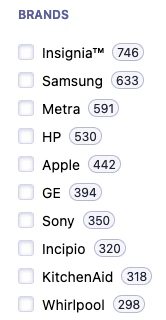
For example, add the [`RefinementList`](/doc/api-reference/widgets/refinement-list/react)\` widget and ask it to show a list of brands, so your users can refine their search using those brands.
```jsx React icon=code theme={"system"}
import { liteClient as algoliasearch } from "algoliasearch/lite";
import { InstantSearch, RefinementList } from "react-instantsearch";
const appID = "ALGOLIA_APPLICATION_ID";
const apiKey = "ALGOLIA_SEARCH_API_KEY";
const indexName = "INDEX_NAME";
const searchClient = algoliasearch(appID, apiKey);
function App() {
return (
);
}
```
### The InstantSearch wrapper
The [`InstantSearch`](/doc/api-reference/widgets/instantsearch/react) wrapper communicates between your app and Algolia.
This is where you add all the widgets.
It accepts a search client and an name.
Refinement list widget
### CSS theme
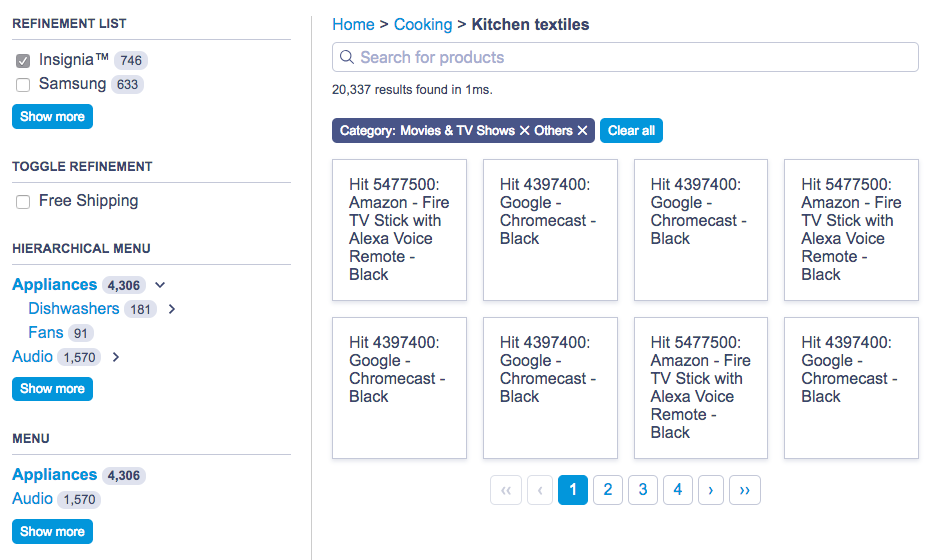
The predefined widgets in React InstantSearch are compatible with the default CSS theme:
Default theme preview
For more information, see [Style your widgets](/doc/guides/building-search-ui/widgets/customize-an-existing-widget/react#style-your-widgets).
If you use Hooks and you want to use the default theme in your app,
follow the markup from the predefined widgets and use the InstantSearch class names.
## Use Hooks
Algolia's predefined widgets, with their fixed behavior and output, may not fully meet your requirements.
For example, you might want to use React InstantSearch with a component library like [Material UI](https://mui.com/material-ui/) or render to a non-DOM target like [React Native](https://reactnative.dev/).
To address these limitations, use [Hooks](https://react.dev/reference/react/hooks) to construct the UI you want:
* [`useBreadcrumb`](/doc/api-reference/widgets/breadcrumb/react#hook)
* [`useClearRefinements`](/doc/api-reference/widgets/clear-refinements/react#hook)
* [`useConfigure`](/doc/api-reference/widgets/configure/react#hook)
* [`useCurrentRefinements`](/doc/api-reference/widgets/current-refinements/react#hook)
* [`useDynamicWidgets`](/doc/api-reference/widgets/dynamic-facets/react#hook)
* [`useHierarchicalMenu`](/doc/api-reference/widgets/hierarchical-menu/react#hook)
* [`useHits`](/doc/api-reference/widgets/hits/react#hook)
* [`useHitsPerPage`](/doc/api-reference/widgets/hits-per-page/react#hook)
* [`useInfiniteHits`](/doc/api-reference/widgets/infinite-hits/react#hook)
* [`useMenu`](/doc/api-reference/widgets/menu/react#hook)
* [`usePagination`](/doc/api-reference/widgets/pagination/react#hook)
* [`usePoweredBy`](/doc/api-reference/widgets/powered-by/react#hook)
* [`useRange`](/doc/api-reference/widgets/range-input/react#hook)
* [`useRefinementList`](/doc/api-reference/widgets/refinement-list/react#hook)
* [`useSearchBox`](/doc/api-reference/widgets/search-box/react#hook)
* [`useSortBy`](/doc/api-reference/widgets/sort-by/react#hook)
* [`useStats`](/doc/api-reference/widgets/stats/react#hook)
* [`useToggleRefinement`](/doc/api-reference/widgets/toggle-refinement/react#hook)
For more information, see [Customize a React InstantSearch widget](/doc/guides/building-search-ui/widgets/customize-an-existing-widget/react).
### Example component
Here's an example of a custom `RefinementList` component created with
[`useRefinementList`](/doc/api-reference/widgets/refinement-list/react#hook),
and mounted in the [`InstantSearch`](/doc/api-reference/widgets/instantsearch/react) provider.
```jsx App.js theme={"system"}
import { liteClient as algoliasearch } from "algoliasearch/lite";
import { InstantSearch } from "react-instantsearch";
import { RefinementList } from "./RefinementList";
const searchClient = algoliasearch("undefined", "undefined");
function App() {
return (
);
}
```
```jsx RefinementList.js theme={"system"}
import { useRefinementList } from "react-instantsearch";
export function RefinementList(props) {
// Retrieves the refinement `items` and the `refine` function to update the
// refinement
const { items, refine } = useRefinementList(props);
return (
{items.map((item) => (
))}
);
}
function cx(...classNames) {
return classNames.filter(Boolean).join(" ");
}
```
### Pass stable references
When you provide a function to Hooks,
make sure to pass a stable reference to avoid rendering endlessly
(for example, with [`useCallback`](https://reactjs.org/docs/hooks-reference.html#usecallback)).
You don't need to stabilize objects and arrays, because React reuses them between renders unless you create new ones.
```jsx React icon=code theme={"system"}
import { liteClient as algoliasearch } from "algoliasearch/lite";
import React, { useCallback } from "react";
import { InstantSearch, useHits } from "react-instantsearch";
const appID = "ALGOLIA_APPLICATION_ID";
const apiKey = "ALGOLIA_SEARCH_API_KEY";
const searchClient = algoliasearch(appID, apiKey);
function Search({ cartItems }) {
const transformItems = useCallback(
(items) =>
items.map((item) => ({
...item,
isInCart: Boolean(
cartItems.find((cartItem) => cartItem.objectID === item.objectID),
),
})),
[cartItems],
);
const { hits } = useHits({ transformItems });
return <>{/* Your JSX */};
}
function App({ cartItems }) {
return (
);
}
```
## Custom Hooks
React InstantSearch works with all InstantSearch.js connectors: from Algolia, from the community, or even your own.
To create a Hook:
1. [Create a connector](/doc/guides/building-search-ui/widgets/create-your-own-widgets/react#build-a-custom-connector).
2. Use [`useConnector`](/doc/api-reference/widgets/connector/react) to turn the connector into a Hook:
```js useMyWidget.js theme={"system"}
import { useConnector } from "react-instantsearch";
import { connectMyWidget } from "./connectMyWidget";
export function useMyWidget(props) {
return useConnector(connectMyWidget, props);
}
```
```jsx MyComponent.js theme={"system"}
import { useMyWidget } from "./useMyWidget";
export function MyComponent(props) {
const data = useMyWidget(props);
// Render based on the data returned by the Hook
return null;
}
```
```jsx App.js theme={"system"}
import { liteClient as algoliasearch } from "algoliasearch/lite";
import { InstantSearch } from "react-instantsearch";
import { MyComponent } from "./MyComponent";
const searchClient = algoliasearch("undefined", "undefined");
function App() {
return (
);
}
```
You can now use your new Hook and component anywhere within [`InstantSearch`](/doc/api-reference/widgets/instantsearch/react).
## Resources
Use the following links and resources to learn more.
### See also
* [Install React InstantSearch](/doc/guides/building-search-ui/installation/react)
* [Get started](/doc/guides/building-search-ui/getting-started/react)
* [API reference](/doc/api-reference/widgets/react)
* [Code Exchange](https://www.algolia.com/developers/code-exchange/?category=frontend-tools)
* [Support knowledge base](https://support.algolia.com/hc/en-us/sections/19109461315345-InstantSearch-React-InstantSearch-V7)
### Join the community
Ask questions and find answers on those following platforms.
* [Algolia Community Discord](https://alg.li/discord)
* [Stack Overflow](https://stackoverflow.com/questions/tagged/instantsearch)
* [GitHub issues](https://github.com/algolia/instantsearch/issues)
* [Changelog](https://github.com/algolia/instantsearch-android/blob/master/CHANGELOG.md).
 Refinement list widget
### CSS theme
The predefined widgets in React InstantSearch are compatible with the default CSS theme:
Refinement list widget
### CSS theme
The predefined widgets in React InstantSearch are compatible with the default CSS theme:
 Default theme preview
For more information, see [Style your widgets](/doc/guides/building-search-ui/widgets/customize-an-existing-widget/react#style-your-widgets).
Default theme preview
For more information, see [Style your widgets](/doc/guides/building-search-ui/widgets/customize-an-existing-widget/react#style-your-widgets).