In this tutorial, you’ll see how to can filter results inside a rectangular area. This location can either be set manually or taken from the current user position.

Dataset

The guide uses a dataset of the 3,000+ biggest airports in the world.
JSON
[
 {
    "objectID": "3797",
    "name": "John F Kennedy Intl",
    "city": "New York",
    "country": "United States",
    "iata_code": "JFK",
    "_geoloc": {
      "lat": 40.639751,
      "lng": -73.778925
    },
    "links_count": 911
  }
]
To tell Algolia where each record is located, the latitude and longitude must be stored in the _geoloc attribute.

Initialize the client

  1. Download the data set
  2. Set up an API client and send your data to Algolia

Configure index settings

Even if you just want to sort by distance to a location, your textual relevance should also be good so that users can refine the search with a query. To do that, you must configure the . The searchable attributes are: name, city, country, and iata_code.
var response = await client.SetSettingsAsync(
  "ALGOLIA_INDEX_NAME",
  new IndexSettings
  {
    SearchableAttributes = new List<string> { "name", "country", "city", "iata_code" },
    CustomRanking = new List<string> { "desc(links_count)" },
  }
);

Filtering inside a rectangle area

The USA can be considered as a polygon:
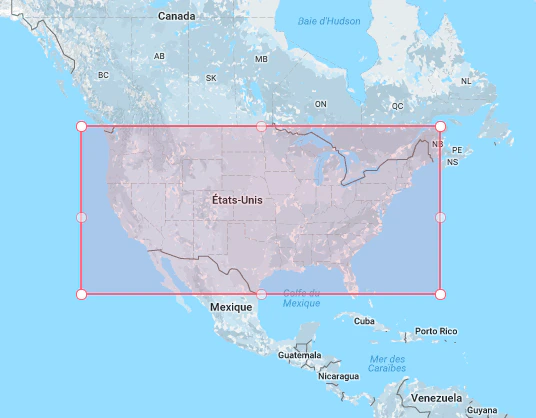
Screenshot of a map showing a red rectangular selection box over the United States, with 'États-Unis' labeled inside the box.
To filter inside this rectangle, you need to pass the upper-left and bottom-right latitude and longitude to the insideBoundingBox parameter:
  • 49.067996905313834, 65.73828125
  • 25.905859247243498, 128.8046875
var response = await client.SearchSingleIndexAsync<Hit>(
  "ALGOLIA_INDEX_NAME",
  new SearchParams(
    new SearchParamsObject
    {
      InsideBoundingBox = new InsideBoundingBox(
        new List<List<Double>>
        {
          new List<Double> { 49.067996905313834, 65.73828125, 25.905859247243498, 128.8046875 },
        }
      ),
    }
  )
);
The empty query ('') returns all matching airports.
Last modified on February 19, 2026