

- Hallucinations: inventing products, prices, or information that doesn’t exist
- Outdated answers: using training data instead of current catalog information
- Limited actions: unable to interact with your app or external services
Tools comparison
Agent Studio supports these tool types, each designed for different use cases:How tools work
When a user interacts with an AI agent, the agent analyzes the message. It selects tools based on:- Tool descriptions: clear, specific descriptions help the LLM choose the right tool
- Agent instructions: system prompts that guide when to use each tool
- Conversation context: previous messages and tool results
hitsPerPage) change with every request.
For more control, set predefined parameters when you add tools.
Use the Agent Studio API or Other tools in the Agent Studio dashboard.
These constraints apply to every tool call.
For example, you can filter out out-of-stock items or limit the retrieved attributes.
- Runtime parameters
- Automatic enrichment
- Predefined parameters
At runtime, the agent chooses parameters based on the user’s query and conversation context.
For more control, configure predefined parameters when you add a tool.For the Algolia Search tool, that means the query text plus one argument per in your index:When a user asks “Show me running shoes under $100”, the agent decides:
- Search query text: “running shoes”, “laptops under $1000”
- Text and boolean facets: values the agent picks from your index metadata, which become
facetFilters - Numeric facets: comparisons such as
<100or>=10, which becomenumericFilters
hitsPerPage included, comes from the tool configuration unless you expose the field to the agent.JSON
- Query:
"running shoes" categoryfacet:shoespricefacet:<100
Business value unlocked by tools
Real-time data access
Real-time data access
Problem: agents using only training data provide outdated or invented information.Solution: Algolia Search tool queries your live index, ensuring accurate, current responses.Example: “What Christian Siriano cases do you have?” searches your actual product catalog instead of guessing.Business impact:
- Reduce hallucinations and incorrect product information
- Always reflect current inventory and pricing
- Build user trust with accurate, grounded responses
Personalized experiences
Personalized experiences
Problem: generic responses that don’t account for user context.Solution: client-side tools access user-specific data like shopping cart contents, order history, and preferences.Example: “What’s in my cart?” retrieves the actual user’s cart, not a generic response.Business impact:
- Increases with personalised recommendations
- Reduce support costs with context-aware responses
- Improve customer satisfaction through relevant interactions
Extended capabilities
Extended capabilities
Problem: agents can’t interact with external systems or third-party data.Solution: MCP tools connect to weather APIs, inventory systems, CRMs, and more.Example: “What gear should I bring for hiking in Seattle this weekend?” uses a weather API to suggest the right outdoor gear from your catalog.Business impact:
- Unlock new use cases by combining multiple data sources
- Provide context-aware recommendations based on external factors
- Create differentiated experiences competitors can’t replicate
Actionable agents
Actionable agents
Problem: agents can only provide information, not take action.Solution: client-side tools carry out actions like adding items to a shopping cart or applying filters.Example: “Add this laptop to my cart” adds the product, rather than just confirming it’s possible.Business impact:
- Reduce friction in the purchase journey
- Increase conversion with seamless cart management
- Enable automated shopping experiences
Parallel tool calling
Parallel tool calling
Problem: sequential tool calls create delays and consume more tokens through multiple inference rounds.Solution: Agent Studio supports parallel tool calling.
The LLM can call multiple tools at once and process all results in a single inference step.Example: “Compare prices for running shoes across our outlet and premium stores” calls both indices at once, instead of one after the other.
The two searches require one round trip instead of two.Business impact:
- Reduce response latency for complex queries requiring multiple data sources
- Lower token consumption and LLM costs by eliminating repeated tool calls (agentic loops)
- Improve user experience with faster, more efficient responses
This capability depends on the selected LLM model but most support it by default.
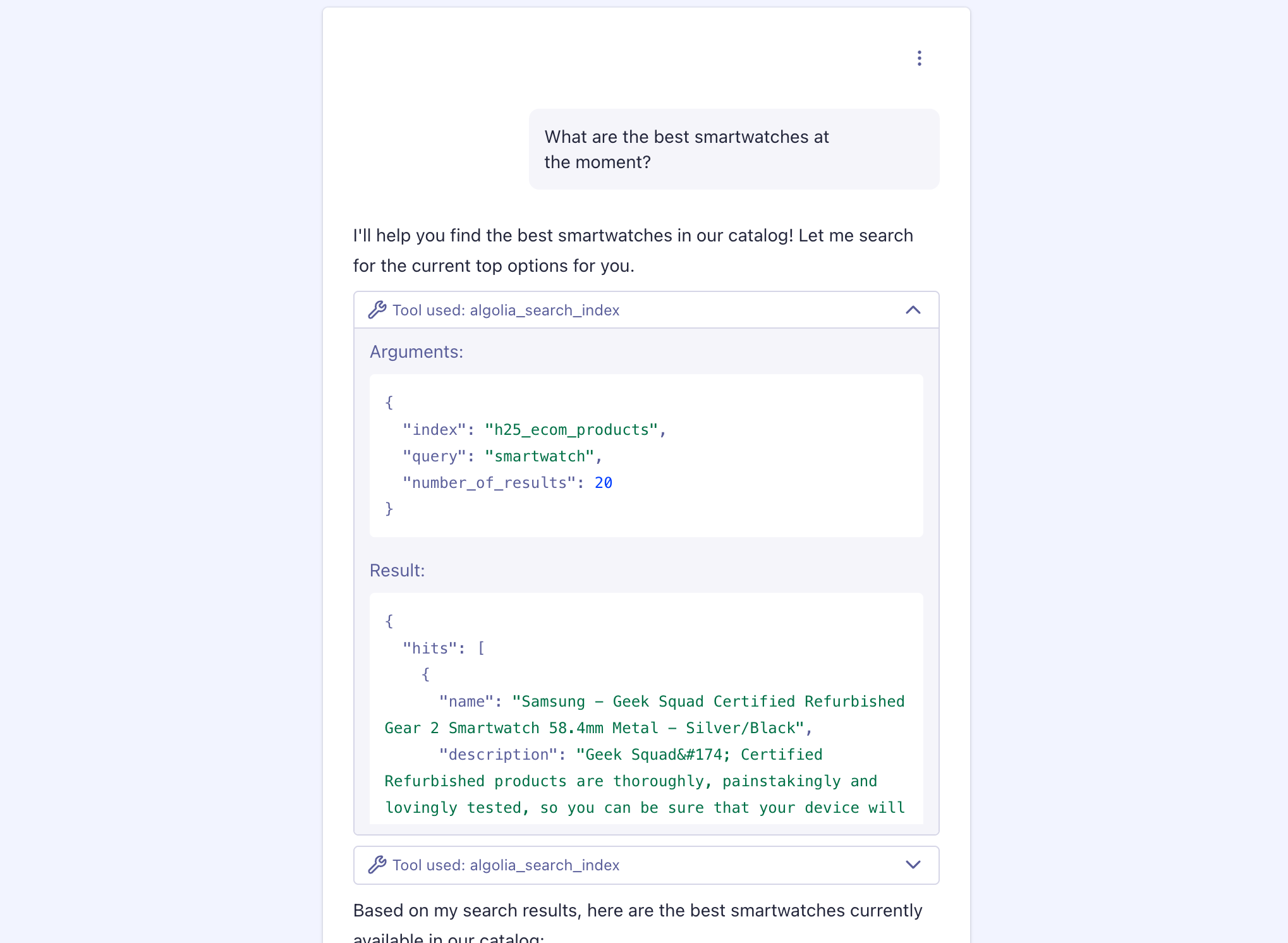
Test tools in live preview
After configuring tools, check they work using the Live preview panel in the Agent Studio dashboard. Send a test message that should trigger a tool call. When the agent calls a tool, you’ll see an expandable tool indicator in the conversation. It shows:- Tool used: the tool the agent used (for example,
algolia_search_index) - Arguments: the parameters the agent sent (index name, query, filters, limits)
- Result: the data the tool returned (search hits, product details, API responses)
Debug your tools
- Tool not called: verify tool descriptions and agent instructions are clear and specific
- Incorrect parameters: check tool parameter definitions, descriptions, and required field constraints
- Unexpected response format: test tool implementation and ensure data structure matches schema
- Agent misinterprets results: refine tool descriptions or add examples in agent instructions
- Tool timeout or error: review server logs, authentication credentials, and network connectivity
Optimize tool usage
- Start simple: begin with one Algolia Search tool. Test it, then add complexity only when needed. Using more than 10 tools can reduce agent reliability.
- Write clear descriptions: use specific descriptions, such as “Ecommerce product catalog with electronics, clothing, and home goods.” Avoid generic ones like “Products.” Clear descriptions help the agent decide well.
- Limit tool count: aim for 3-5 tools per agent. More than 10-15 tools can reduce accuracy as each tool increases cognitive load.
- Test incrementally: add one tool at a time and verify it works before adding more. This isolates issues and prevents compounding complexity.