

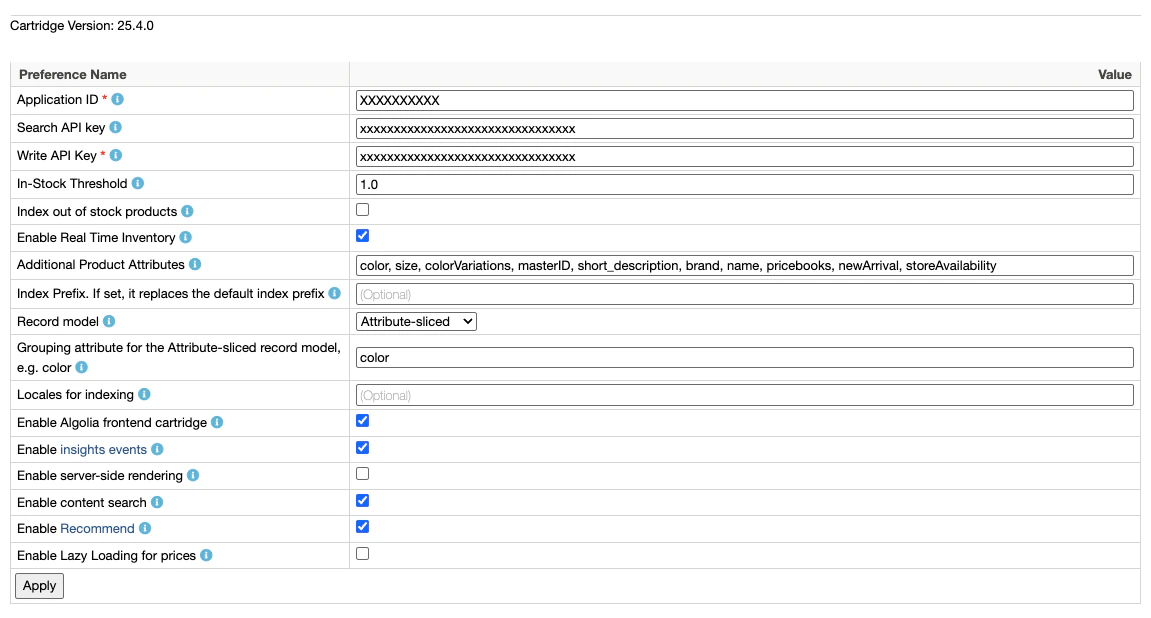
Application ID
Application ID
Algolia_ApplicationID (required)This is your unique Algolia application identifier.
Find it in the Algolia dashboard.Search API key
Search API key
Algolia_SearchApiKey (required, optional for headless)This is your Algolia public API key to use in your frontend code.
Find it in the Algolia dashboard.Write API key
Write API key
Algolia_AdminApiKey (required)This is your Algolia write API key. Keep this key secret, and only use it in the backend. Algolia uses this key to create, update, and delete your records and indices.In-Stock Threshold
In-Stock Threshold
Algolia_InStockThreshold (optional, default value: 1)A product is considered in stock when the available quantity is greater than or equal to this threshold.Index out of stock products
Index out of stock products
Algolia_IndexOutOfStock (default value: false)Index out of stock products.
When this setting is off, only in-stock products whose available-to-sell (ATS) quantity meets or exceeds Algolia_InStockThreshold are indexed.Enable Real Time Inventory
Enable Real Time Inventory
Algolia_EnableRealTimeInventory (default value: false)If enabled, the cartridge sends inventory updates to Algolia after each order if a product is out of stock.Additional Product Attributes
Additional Product Attributes
Algolia_AdditionalAttributes (optional)Any additional product attributes to send to Algolia (comma-separated list).To select the recommended ProductActiveData fields for custom ranking, use Active data for custom ranking instead.
To index any other ProductActiveData field, add its ID here without the activeData. prefix.
Before you do, see the privacy warning under Active data for custom ranking.Active data for custom ranking
Active data for custom ranking
Algolia_CustomRankingActiveData (optional)Select the recommended ProductActiveData fields to index at the record root for custom ranking.
The checkbox list includes these fields:conversionMonth.conversionWeekordersMonthordersWeekrevenueMonthrevenueWeek
ProductActiveData attributes.
To index any field not in the checkbox list, add its ID (without the activeData. prefix) to Additional Product Attributes.When you save this preference, the cartridge checks every existing product index it writes to and warns if any selected field is missing from unretrievableAttributes.
Indices that don’t exist yet, and replica indices, aren’t checked.Index Prefix
Index Prefix
Algolia_IndexPrefix (optional)If set, it replaces the first two segments of the index name.
The default names are: <hostname>__<siteID>__products__<locale> and <hostname>__<siteID>__categories__<locale>.Record model
Record model
Algolia_RecordModel (default value: Variation product)Define the shape of the records generated by the cartridge. For more information, see Record models.Grouping attribute for the Attribute-sliced record model
Grouping attribute for the Attribute-sliced record model
Algolia_AttributeSlicedRecordModel_GroupingAttribute (required only if Attribute-sliced is selected as the record model)Choose the variation attribute that base products with multiple variation attributes are grouped by when using the Attribute-sliced record model, for example color.Indexing API
Indexing API
Algolia_IndexingAPI (default value: Search API)The Algolia API to use for indexing requests.
The Ingestion API unlocks features such as Collections and Transformations, but has higher per-request overhead.
If you don’t need those features, keep the default Search API.
For more information, see Index with the Ingestion API.Analytics region
Analytics region
Algolia_AnalyticsRegion (required when Indexing API is set to Ingestion API)The analytics region of your Algolia application.
Allowed values are us and eu.
Find your region under Infrastructure > Analytics in the Algolia dashboard.
Ignored when Indexing API is set to Search API.Locales for indexing
Locales for indexing
Algolia_LocalesForIndexing (optional - leaving this empty indexes all locales assigned to your site)Specify which locales to index in a comma-separated list, for all job types. Locales are case-sensitive.Enable Algolia frontend cartridge
Enable Algolia frontend cartridge
Algolia_Enable (default value: true)Enable the SFRA or SiteGenesis cartridge on the Salesforce B2C Commerce storefront.Enable Insights Events
Enable Insights Events
Algolia_EnableInsights (default value: false)If true, the Storefront sends Insights API events to Algolia:, including views, clicks, add-to-cart actions, and purchases.Enable server-side rendering
Enable server-side rendering
Algolia_EnableSSR (default value: false)Enables server-side rendering for category landing pages and search results to improve SEO for public search engines. Applies only to SFRA cartridges.Enable Content Search
Enable Content Search
Algolia_EnableContentSearch (default value: false)Enable Algolia Content Search on the SFRA storefront cartridge.Enable Recommendations
Enable Recommendations
Algolia_EnableRecommendations (default value: false)Enable Algolia Recommend on the SFRA storefront cartridge.Enable Pricing Lazy Loading
Enable Pricing Lazy Loading
Algolia_EnablePricingLazyLoading (default value: false)Enable lazy loading of pricing and promotions data from SFCC.